
How to write automatic comment replies that don't look like spam
Comment replies & DMsUpdated Published By Team CommenSense
On this page
When a "comment GUIDE" post takes off, your account can post hundreds of replies under it in an hour. If they're all the same sentence, the comment section looks like a bot wrote it, because one did. Meta's spam policy treats repetitive content and engaging "at very high frequencies" as signs of spam (Meta Community Standards: Spam). The fixes below make your replies read like a person answered, and keep their number in proportion.
Where do I write the replies?
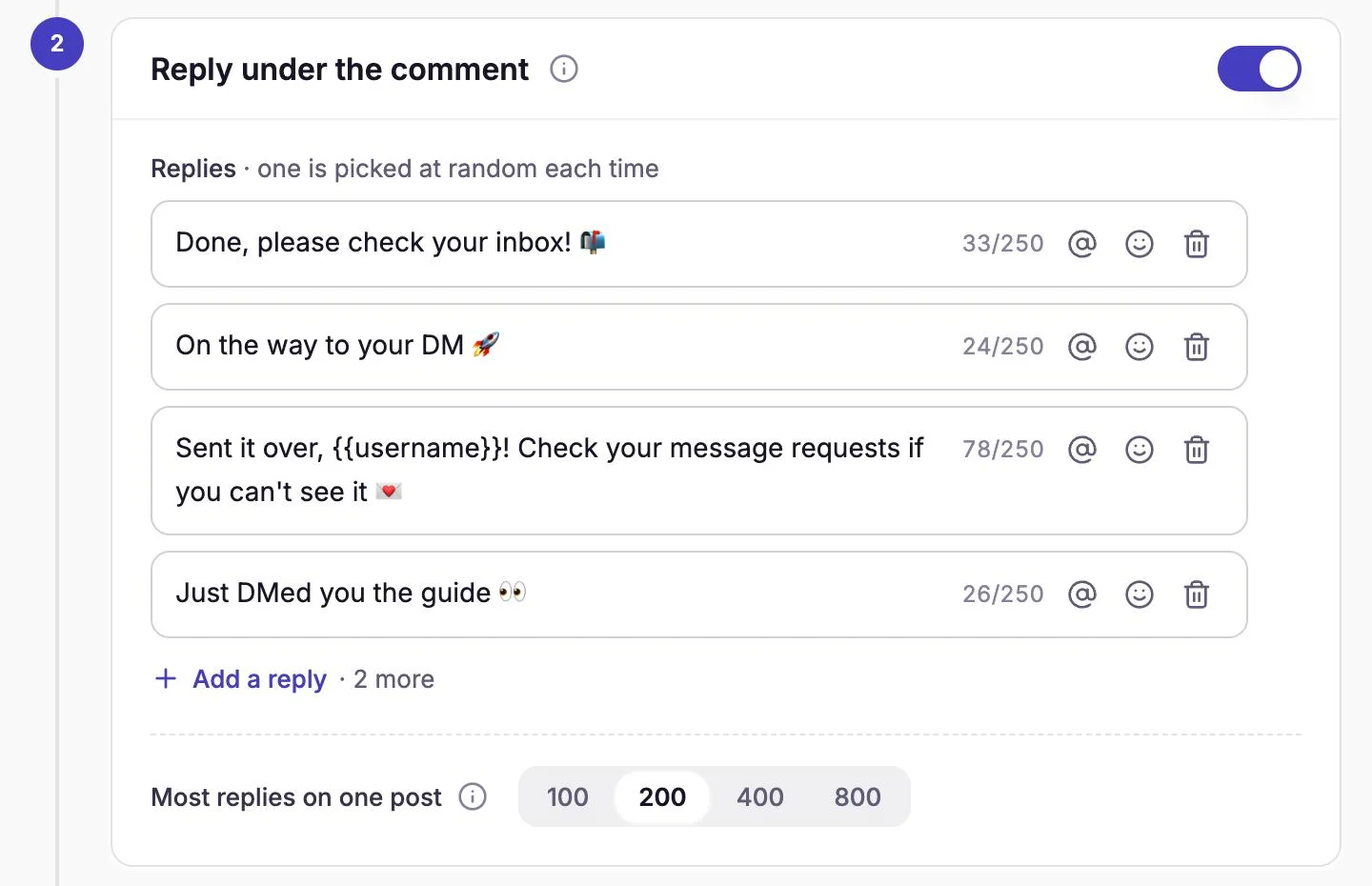
In an automation's Reply under the comment step. Each reply can be up to 250 characters, and CommenSense picks one at random for each comment. You need at least 3, and you can add up to 6 with Add a reply.
Seven rules for replies that read like a person
1. Write at least four, and make them really different
Three versions is the minimum, but with three, a third of your replies are the same sentence. Write four to six, and change more than the emoji: a different opening, a different length, a different way of saying "check your DMs".
| Too similar | Different enough |
|---|---|
| "Sent! Check your DMs 🔥" / "Sent! Check your DMs 🚀" | "Sent! Check your DMs 🔥" / "Just DMed you the guide 👀" |
| "Check your inbox!" / "Check your inbox!!" | "Check your inbox!" / "It's in your messages, enjoy!" |
2. Use their name in some replies
Select the @ button in a reply to add {{username}}. When the reply is posted, it
becomes the commenter's @username, so the reply is addressed to them. Use it in some versions, not all, so the replies
don't all start the same way.
3. Tell them where to look
If they don't follow you, Instagram puts your DM in their message requests, not their main inbox (Meta: Private replies). A reply such as "Sent! If you don't see it, check your message requests" answers the most common follow-up question before it's asked.
4. Keep them short, and leave the link for the DM
One line is enough. Links in Instagram comments aren't clickable, so a link in a public reply only adds clutter; the DM is where the link belongs. Don't repeat the keyword back at them either: "GUIDE sent!" under a hundred "GUIDE" comments makes the thread look even more automated.
5. Match the post
A reply that fits the post reads like a person: "Recipe's in your DMs, happy baking!" on a cake reel, "Sent you the size chart!" on a product post. Write new replies for each campaign rather than reusing one set everywhere.
6. Cap the number on busy posts
Most replies on one post sets how many public replies CommenSense posts on one post: 100, 200, 400 or 800. After that, people still get their DM; only the public reply stops. On a giveaway that could draw thousands of comments, a lower cap keeps your replies from taking over the comment section. New automations start at 100.
On a very busy post, CommenSense may also leave some comments without a public reply, to keep your account safe. Those people still get their DM.
7. Ask whether you need a public reply at all
The reply is optional. If your caption already says "comment GUIDE and check your DMs", you can switch off Reply under the comment and send only the DM. Public replies help most when the comment section is your proof that the offer works, for example on a giveaway.
What CommenSense already does
- Replies only after the DM arrives. In an automation that sends a DM, the public reply is posted once your first message has reached the person, so "check your DMs" is always true.
- One reply per comment. A comment gets one reply from an automation, even if it's handled again by a re-run.
- A steady pace. Replies and DMs go out through a queue that stays below Instagram's limits, and sending pauses when Instagram signals it's too fast. See Instagram's rules for automated replies and DMs.
A ready-made set to start from
Copy these and change the words to fit your post:
- "Sent! Check your DMs 📩"
- "Just DMed you, {{username}} 👀"
- "On its way! If you can't see it, check your message requests."
- "Done, enjoy the guide!"
- "In your inbox now 🙌"
For whether automation is safe for your account at all, see is it safe to automate Instagram replies and DMs?
Related guides
How to send an automatic DM when someone comments on your Instagram post
Set up a comment-to-DM automation in CommenSense: choose the post, the keywords and the message, and see exactly what the commenter receives.
Updated
Instagram's rules for automated replies and DMs, explained
How many automated DMs Instagram allows, the 7-day and 24-hour windows, and which limits are Meta's and which are CommenSense's own settings.
Updated
Is it safe to automate Instagram replies and DMs?
An honest answer: what can get an Instagram account restricted, what Meta's rules allow, and what CommenSense does to keep automated replies and DMs within them.
Updated