
How to send your automation to people who commented before you set it up
Comment replies & DMsUpdated By Team CommenSense
On this page
Automations only respond to comments that arrive after they exist. If your post went up first and the automation came later, or it was switched off for a while, the people who commented in that gap got nothing. Re-run catches them up.
How do I re-run an automation?
In the left sidebar, open Automations.
On the automation's row, select the three dots (More), then Re-run on past comments.
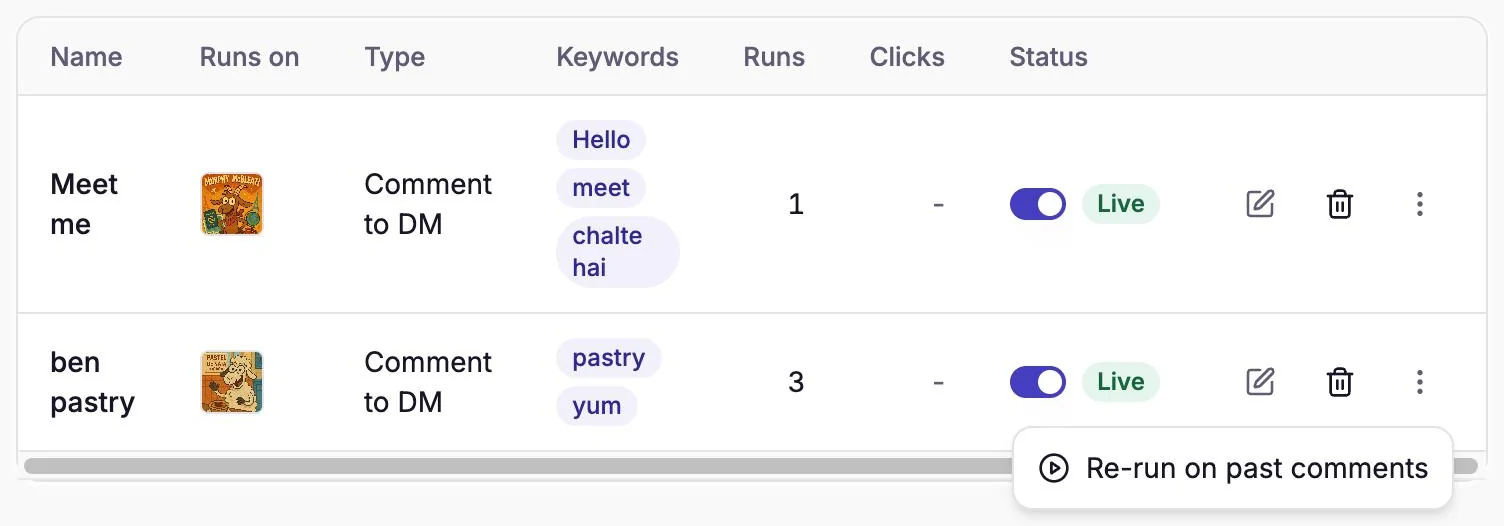
Re-run lives in each automation's More menu. If the automation runs on every comment, check the number and confirm.
For an automation with Run on every comment switched on, CommenSense first counts how many comments it would reach and asks, for example "Re-run for 42 comments?". Select Start re-run to go ahead. If every recent comment has already been handled, it says "Nothing left to re-run" instead.
For an automation with keywords, the re-run starts straight away, since it only reaches matching comments.
Let it run.
"Re-run started" confirms it. It works in the background, so you can leave the page. While it runs, the menu item reads Re-run in progress…, and a Cancel rerun option appears below it if you need to stop.
When it's done, a notification called Automation Rerun Complete tells you how many were sent, skipped and, if any, failed.
Which comments does a re-run reach?
Each comment on the post is checked against the same rules as a live comment, plus a few of its own. A comment gets your reply or DM only if it:
- was posted in the last 7 days;
- is a top-level comment, not a reply inside a thread;
- has text in it, and contains one of your keywords (or the automation runs on every comment);
- isn't from your own account;
- hasn't already been handled by this automation.
That last point matters: re-running never sends anyone the same message twice. You can re-run after changing your keywords, and only the newly matching comments get a response.
For a Reply to comment automation, your Reply limit per post still applies. Once the post reaches it, the remaining comments are skipped.
Why is Re-run greyed out?
The menu item says why, under its name:
| What it says | Why | What to do |
|---|---|---|
| Only for automations on one post | It's an All posts automation. | Create a One post automation for the post you want to catch up on, then re-run that. |
| Not available for story automations | Story replies can't be fetched again. | Nothing to re-run; stories also expire after 24 hours. |
| Included in Pro and Business | Your plan doesn't include Re-run. | Upgrade to Pro or Business. |
If it says Re-run in progress…, a re-run of that automation is already going. Wait for it to finish, or cancel it.
Why is it limited to 7 days?
It matches Instagram's own window: Meta only lets an app send a DM in reply to a comment within 7 days of that comment (Meta's documentation), so older comments couldn't get the DM anyway. Read Instagram's rules for automated replies and DMs for the rest.
Will a big re-run take a while?
It can. CommenSense sends re-run messages through the same queue as live ones, at a steady pace Instagram accepts, and live comments come first. A re-run reaching hundreds of comments can take some time to finish. That's expected; the notification arrives when it's done.
Tips
- Set the automation up first, then re-run. Re-run uses the automation as it is now, including its message.
- Re-run soon. Comments older than 7 days can't be reached.
- Check the count on catch-all automations. "Run on every comment" plus a re-run can mean a lot of DMs at once. The confirmation number is there so you can decide.
Related guides
How to send an automatic DM when someone comments on your Instagram post
Set up a Comment to DM automation in CommenSense: choose the post, the keywords and the message, and see exactly what the commenter receives.
Updated
Why didn't my automation reply or send a DM?
Work out why a CommenSense automation skipped a comment, from keyword matches and status to follow checks, plan limits and Instagram delays.
Updated
Instagram's rules for automated replies and DMs, explained
How many automated DMs Instagram allows, the 7-day and 24-hour windows, and which limits are Meta's and which are CommenSense's own settings.
Updated