
How to ask people to follow you before they get your DM
Comment replies & DMsUpdated Published By Team CommenSense
On this page
Asking for a follow before sending a freebie, a discount code or a link is a common way to turn commenters into followers. This guide shows how to switch it on, exactly what the commenter sees, and how it behaves when people don't follow, or say they do when Instagram disagrees.
How do I turn it on?
Open Automations and edit your automation (the pencil), or select New automation.
Under Add a step before the DM, select Ask to follow.
An Ask them to follow you first step appears before Send a DM, with three settings.
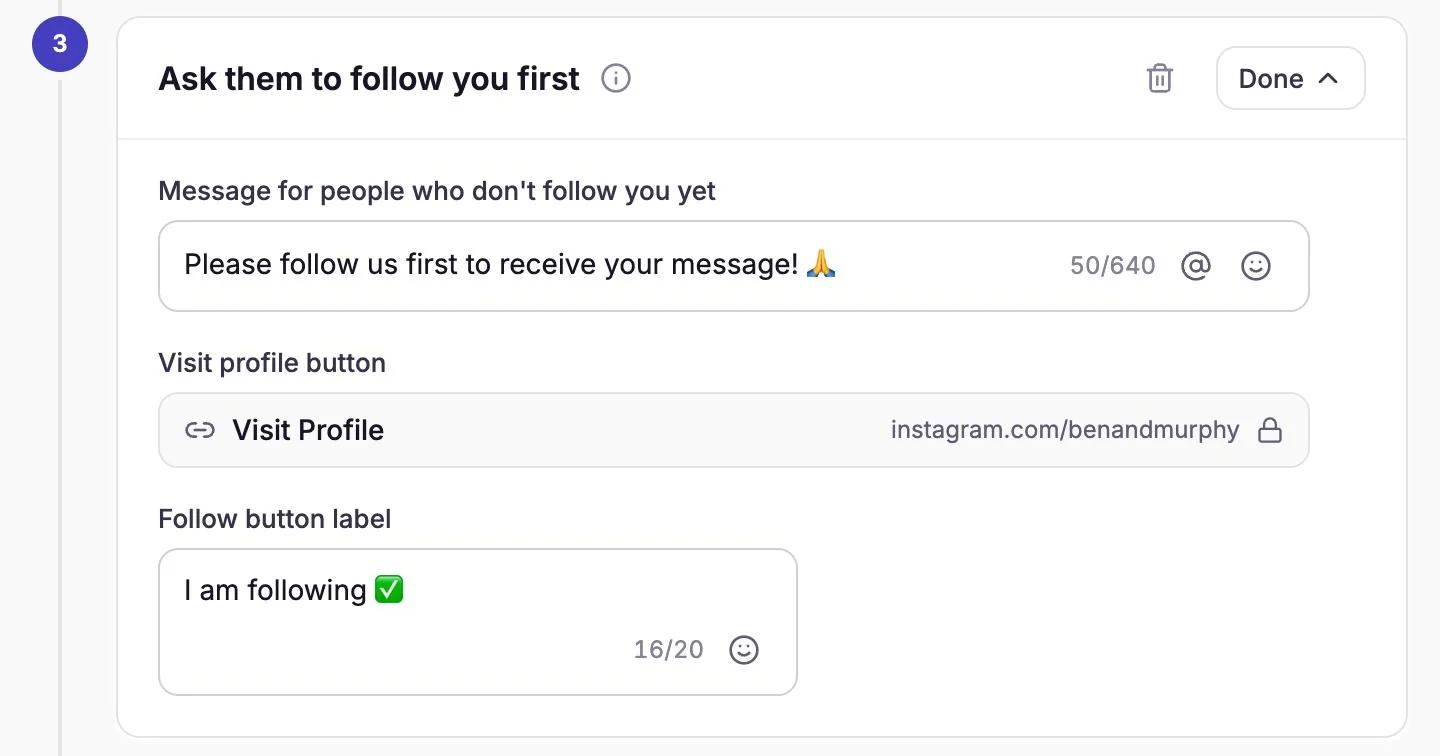
The follow-first step. Check the three settings.
Message for people who don't follow you yet: what they're sent if they don't follow you yet, up to 640 characters. It needs at least two versions, and one is picked at random each time, so not everyone gets the same words. It starts with two already written, beginning with "Please follow us first to receive your message! 🙏".
Visit profile button: a button that opens your Instagram profile so they can follow. It's added automatically and can't be changed.
Follow button label: the button they tap after following, up to 20 characters (Instagram's limit). It starts as "I am following ✅".
Select Save changes (or Create automation for a new one).
To stop asking later, select the bin on the step to remove it, and save.
What does the commenter see?
- They comment your keyword.
- CommenSense checks with Instagram whether they follow you.
- If they follow you, they get your DM, as usual.
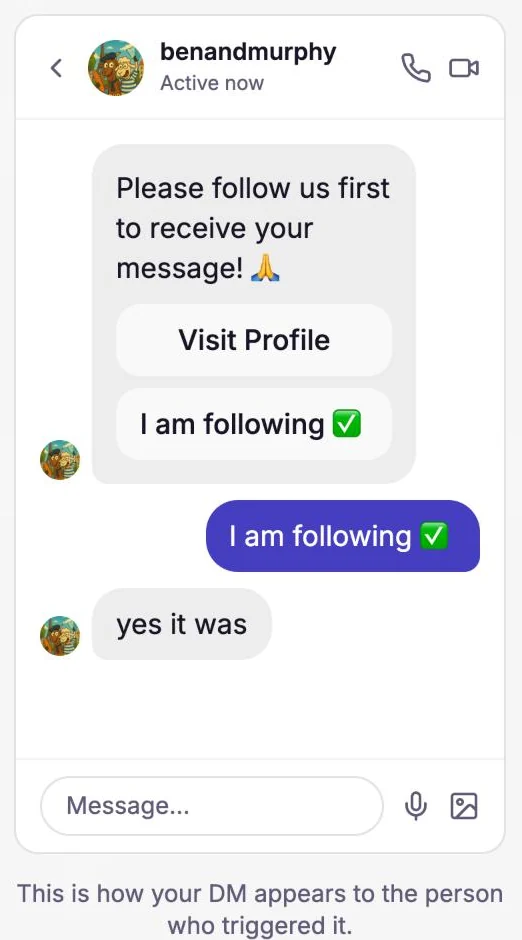
- If they don't, they get your follow message with two buttons: Visit Profile and your follow button.
- They follow you, come back to the chat and tap the follow button. CommenSense checks again and, if they now follow you, sends your DM.
The preview shows this conversation. On a wide screen it's next to the steps; on a narrower one, select the Preview button at the bottom right. Select DM under it to see the follow message as the commenter will.
Your public reply under their comment, if you set one, is posted once the first message reaches them. That can be the follow message, so "check your DMs" is still true.
What happens if they tap without following?
They get the follow message again, and can follow and tap as many times as they need, up to 5 checks in total (the first check, when they comment, counts as one). If the fifth check still says they don't follow you, they get one closing message instead, which says:
No worries! Whenever you've followed us, just tap "I am following ✅" again and we'll send it right over.
It uses your own follow button label.
That door stays open. If they follow you later and tap the button on any earlier follow message, CommenSense checks again and sends the DM. After the fifth check, taps are answered at most once every 5 minutes, so tapping repeatedly doesn't help.
Why was someone who follows me asked to follow?
A few reasons:
- They tapped the button before following. It's easy to tap first and follow second. Tapping again after following works.
- They followed a different account, such as your second brand account.
- Instagram's follower check failed. If Instagram doesn't answer, CommenSense counts it as "not following" rather than guessing. The next tap checks again.
If someone says they follow you and still gets the message after a few taps, work through why didn't my automation reply or send a DM?
Does it work with the other steps before the DM?
Yes. If you add more than one, they run in the order the page shows them:
- Opening message: they tap its button.
- Ask them to follow you first: the follow check.
- Collect email or phone: they reply with their details.
- Your DM.
Every extra step is one more thing a person has to do before they get your DM, and some people stop partway. Use following first when the follow is worth more to you than the few people who won't take that step.
Does it work on re-runs?
Yes. When you re-run an automation on past comments, people who commented earlier go through the same follow check, so non-followers get the follow message, not the DM.
Things to keep in mind
- You can personalise the follow message. Use the @ button in the message box to add the commenter's username, just like in your DM.
- Following first doesn't use comment scans or any other allowance.
- Keep the follow message short and specific, for example "Follow us and tap the button below to get the guide". It's the one message every non-follower reads.
Related guides
How to send an automatic DM when someone comments on your Instagram post
Set up a comment-to-DM automation in CommenSense: choose the post, the keywords and the message, and see exactly what the commenter receives.
Updated
Why didn't my automation reply or send a DM?
Work out why a CommenSense automation skipped a comment, from keyword matches and status to follow checks, plan limits and Instagram delays.
Updated
How keywords work in CommenSense (and how to choose good ones)
Why a keyword can match the wrong comment, how CommenSense matches keywords in automations and hide rules, and how to pick ones that work.
Updated