
How to auto-reply to Instagram story replies
Comment replies & DMsUpdated Published By Team CommenSense
On this page
"Reply MENU to this story and I'll send you the prices" works like a comment-to-DM post, but on a story. The person replies from the message box at the bottom of your story, and CommenSense answers in that conversation.
How do I set it up?
In the left sidebar, open Automations and select New automation.
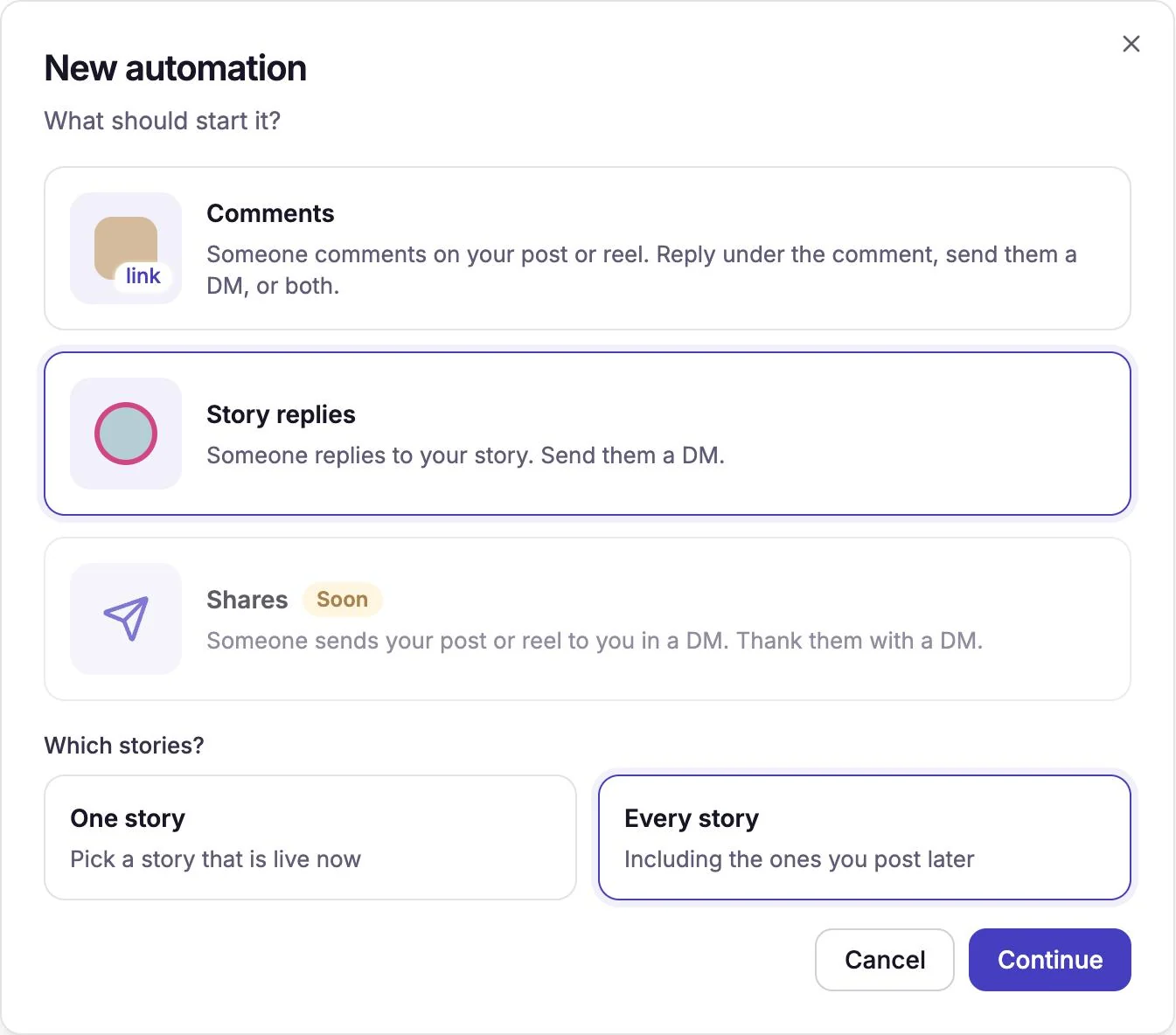
Choose Story replies, then which stories it runs on.
Every story runs on all your stories, including the ones you post later. Select Continue.
One story runs on a single story. Select Choose the story and pick it. Only stories that are live now are listed; if there are none, post the story first and come back.
Story replies, on every story. In When someone replies to your story, add your keywords.
Type each word and press Enter, up to 15. A reply starts the automation if it contains any of them, ignoring capital letters. To answer every reply, whatever it says, set Which replies? to Every reply.
In Send a DM, write the message.
It starts as a plain Text message. Select Change to send buttons, a picture card or a carousel instead (see the DM formats). You can also add an opening message, a follow check or a question for their email under Add a step before the DM.
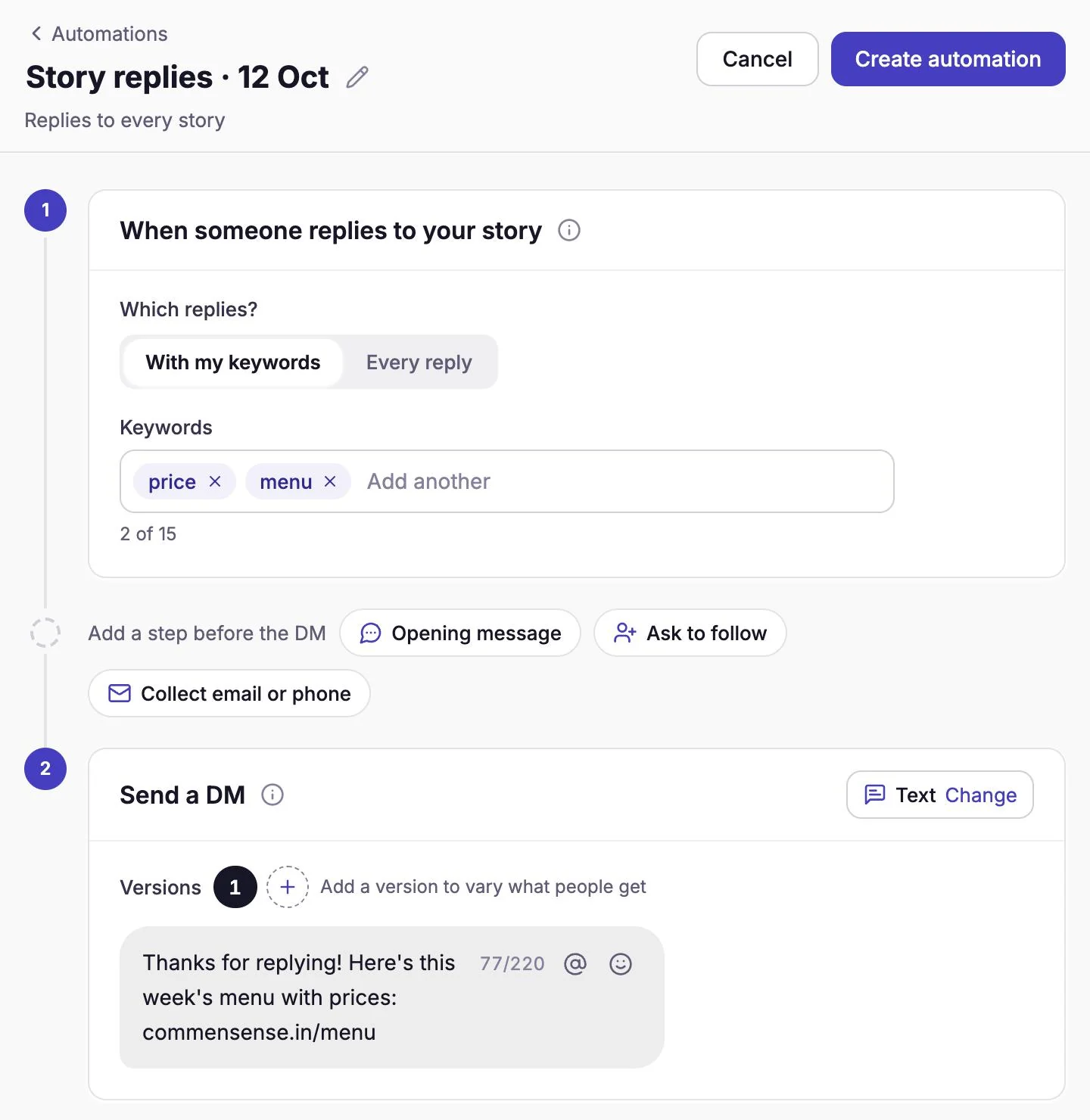
A story automation: keywords, then the DM. Select Create automation.
It's live straight away. Test it by replying to your story from a different Instagram account.
How is it different from a comment automation?
| Story reply automation | Comment automation | |
|---|---|---|
| What starts it | A reply sent from your story's message box | A comment on a post or reel |
| Public reply | None: a story reply is already private | Optional reply under the comment |
| Where your DM lands | In the chat they started by replying, so it's in their inbox | Their inbox if they follow you, otherwise message requests |
| How long replies come in | Mostly while the story is up, its first 24 hours | As long as people find the post |
There's no Reply under the comment step and no DM switch, because the DM is the whole point of a story automation.
Which replies start it?
- Replies with text. The text is checked against your keywords, the same way as comments: a keyword matches anywhere in the reply, ignoring capital letters. See how keywords work.
- Replies with no text never start it, such as a photo, a GIF or a sticker sent on its own. CommenSense has no words to check, even with Every reply.
- Only replies to your story. Ordinary messages sent straight to your inbox don't start a story automation.
If several story automations match, CommenSense picks one, in the same order as for comments: one for this story with a matching keyword, then one for this story set to Every reply, then an every-story automation with a matching keyword, then an every-story automation set to Every reply. Among equals, the most recently edited wins.
What should I know before I post?
- Say the keyword on the story. A text sticker such as "Reply MENU for prices" tells people exactly what to send.
- A story's replies mostly come in its first 24 hours. After that it leaves your story, and with it most of the replies. For a keyword you use again and again, an Every story automation is simpler than a new one for each story.
- Greeting by name works here too. The @ button puts in the username of the person who replied, the same as for comments.
- The Free plan adds a short line ("Sent using commensense.in") to the end of the DM. Paid plans don't.
Common questions
Can I reply to people who react to my story with an emoji? A reply only starts the automation if it contains text. Story likes, the heart on a story, aren't messages, so they never start it.
Will people who reply to my story get the DM twice? Each reply is handled once. If the same person replies again later, that new reply counts on its own, just like a new comment.
My story automation didn't answer. What do I check? Make sure it's switched on in Automations, that it was made for the account that posted the story, that the reply contained one of your keywords, and that it was a reply to the right story. Then work through why an automation didn't reply or send a DM.
Related guides
How to send an automatic DM when someone comments on your Instagram post
Set up a comment-to-DM automation in CommenSense: choose the post, the keywords and the message, and see exactly what the commenter receives.
Updated
How keywords work in CommenSense (and how to choose good ones)
Why a keyword can match the wrong comment, how CommenSense matches keywords in automations and hide rules, and how to pick ones that work.
Updated
Why didn't my automation reply or send a DM?
Work out why a CommenSense automation skipped a comment, from keyword matches and status to follow checks, plan limits and Instagram delays.
Updated