
How to collect emails and phone numbers from Instagram comments
Comment replies & DMsUpdated By Team CommenSense
On this page
It's the comment-to-DM version of a sign-up form: "Comment GUIDE and I'll send it to you" becomes a list of email addresses or phone numbers you can use afterwards.
How do I set it up?
Create a Comment to DM automation, or open an existing one, and go to the Advanced step.
Set up the keyword and the DM as usual on Basics and Content. The DM is what they get after they've given you their details, so that's where the link or the guide goes.
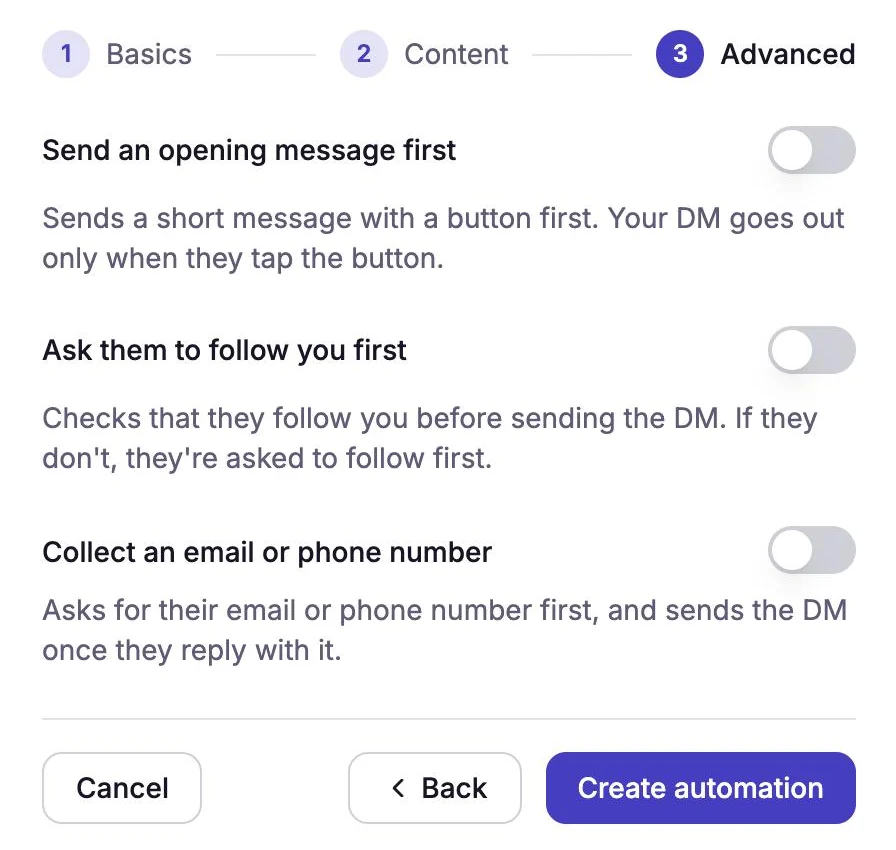
Collect an email or phone number is the third switch. Switch on Collect an email or phone number.
A window called Collect contact details opens.
Under What to collect, choose Email or Phone.
One automation collects one of the two. To collect both, use two automations with different keywords.
Write the Message asking for their details.
Up to 250 characters, sent as a plain text DM. Ask them to reply with just the email address or number (see what counts as a valid answer). To greet them by name, type
{{username}}; it becomes their @username.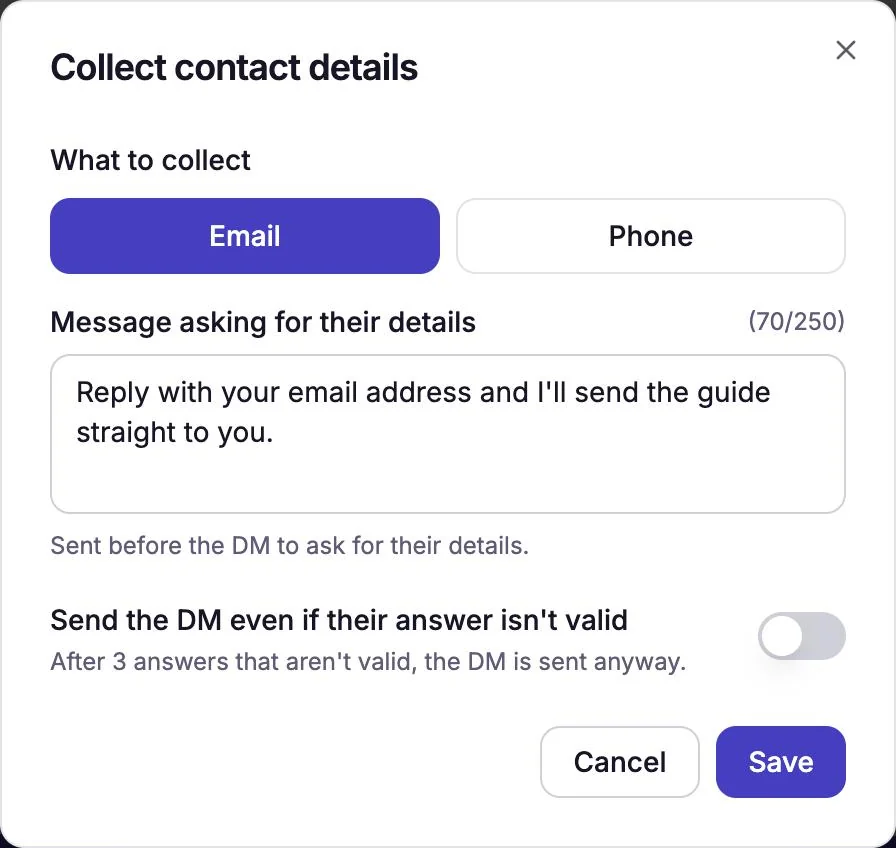
Asking for an email address. Decide whether to switch on Send the DM even if their answer isn't valid.
Off, people who can't give a valid answer in 3 tries don't get your DM. On, they get it anyway. See what happens if their answer isn't valid.
Select Save, then Create automation (or Save changes on an existing one).
Under the switch, a line such as "Collecting email." confirms it. Select Edit there to change the settings later.
What does the person who comments see?
- They comment your keyword.
- They get your question as a DM. If you also switched on Send an opening message first or Ask them to follow you first, those come first, and the question follows.
- They reply with their email address or phone number.
- If it's valid, they get your DM straight away. If it isn't, they're asked again.
If they don't follow you, Instagram puts the first message in their message requests, so it's worth saying "check your message requests" in your caption.
What counts as a valid answer?
CommenSense checks the whole reply, not just part of it.
| Collecting | Valid | Not valid |
|---|---|---|
[email protected], [email protected] | my email is [email protected], name@example | |
| Phone | 9876543210, +91 98765 43210, (022) 2345-6789 | call me on 9876543210, 12345, phone |
- An email has to be the address on its own, with an @ and a dot after it.
- A phone number needs 7 to 15 digits. It can start with + and use spaces, dashes, dots and brackets, up to 25 characters in all.
That's why the message should ask for just the email or number: "My email is [email protected]" counts as not valid.
What happens if their answer isn't valid?
They get "That doesn't look like a valid email address. Please try again! 📧" (or the phone number version) and can try again. After 3 answers that aren't valid, they get "No worries! Feel free to reach out anytime. 😊". Then:
- with Send the DM even if their answer isn't valid off, the flow ends there, and they don't get your DM;
- with it on, they get your DM anyway.
Either way, an answer that isn't valid is never saved to Contacts.
The flow also ends if they stop replying: it expires 48 hours after it starts, or 24 hours after their last reply. A reply after that doesn't get an answer.
Where do the emails and phone numbers go?
To Contacts, in the left sidebar. Each person is one row, with their username, Email, Phone and when they were last active. Use the Has email and Has phone filters to see only the people who gave one.
To use the list elsewhere, select Download list. You get a CSV file with Username, Email, Phone and Last Interacted columns, for a spreadsheet or your email tool. If you've picked filters, only those contacts are downloaded.
If someone gives a new email address or number later, it replaces the one saved before.
How do I see how well it's working?
Open Posts, pick the post and go to the Insights tab. Leads captured shows how many people gave a valid email or phone number, and what share of the people asked that is. Automation journey shows how many reached each step. See what the numbers mean.
What if my plan changes?
If you move to the Free plan, people who comment aren't asked for their details: the automation sends the DM straight away, as if the setting were off. Your settings are kept, and asking starts again when you're back on Basic or higher. Contacts you've already collected stay in Contacts.
Tips
- Say what they get. "Reply with your email and I'll send the price list" gets more answers than "What's your email?".
- Keep the flow short. Every extra step loses people. An opening message, a follow check and a question all before the DM is a lot to ask.
- Make the DM worth it. It arrives right after they've given you their details, so put the thing you promised in it.
- Only collect what you'll use, and be clear about how you'll use it.
Related guides
How to send an automatic DM when someone comments on your Instagram post
Set up a Comment to DM automation in CommenSense: choose the post, the keywords and the message, and see exactly what the commenter receives.
Updated
How keywords work in CommenSense (and how to choose good ones)
Why a keyword can match the wrong comment, how CommenSense matches keywords in automations and hide rules, and how to pick ones that work.
Updated
Why didn't my automation reply or send a DM?
Work out why a CommenSense automation skipped a comment, from keyword matches and status to follow checks, plan limits and Instagram delays.
Updated
What the numbers in CommenSense mean
Runs, Clicks, Contacts captured, DMs sent, Moderated and the rest: what each number in CommenSense counts, and why two of them can differ.
Updated