
How to send pictures, a PDF or a voice note in an automatic Instagram DM
Comment replies & DMsUpdated By Team CommenSense
On this page
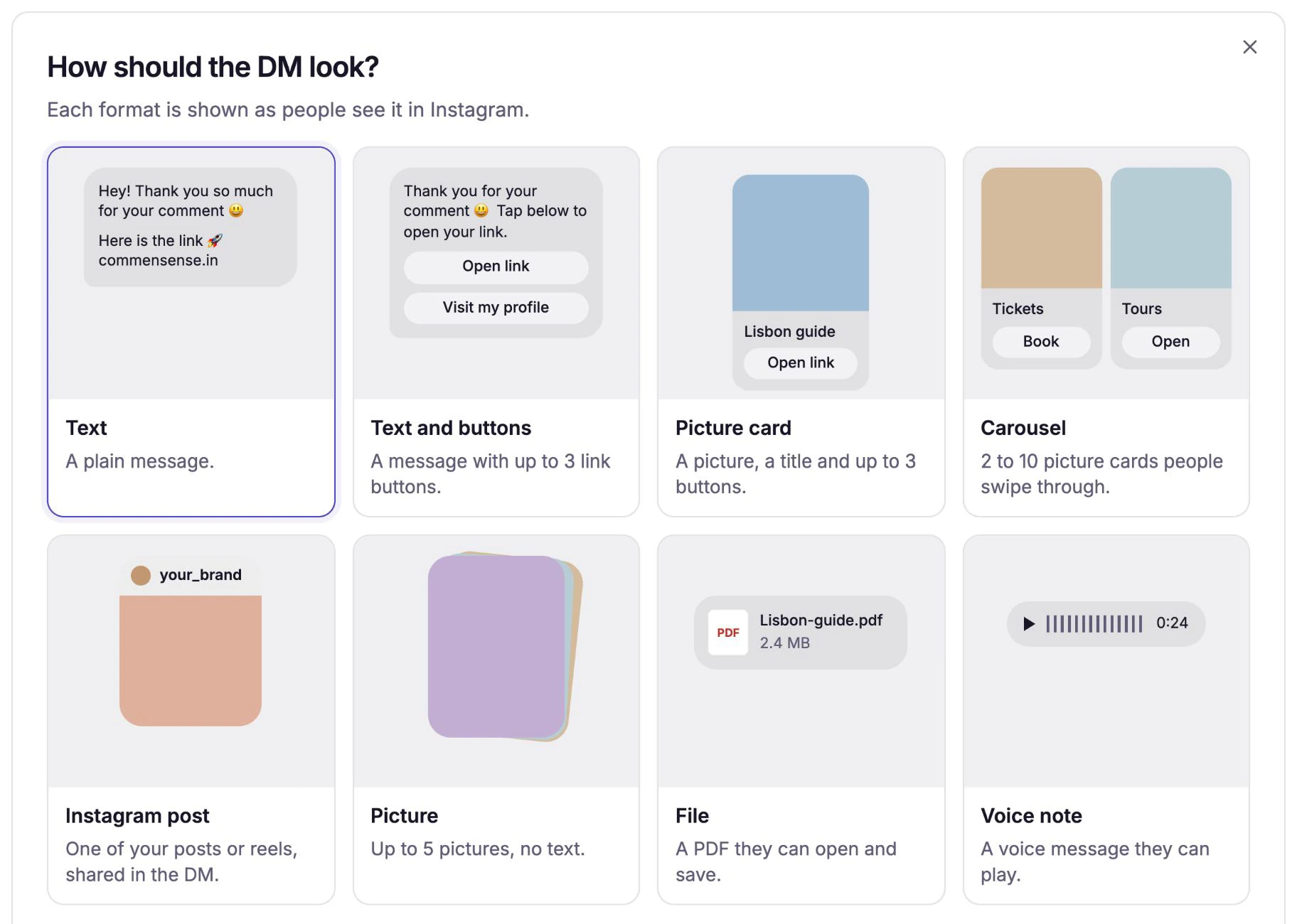
A text message with a link asks people to tap once more and leave Instagram. These formats put the thing itself in the chat: the menu as a picture, the guide as a PDF, a thank-you in your own voice, or your newest reel.
What can I send, and how does it look?
| Format | What they get | Good for |
|---|---|---|
| Picture | 1 to 5 of your pictures, with no text. Several arrive as a stack that opens into a grid. | A menu, a price list, a before and after. |
| File | One PDF, shown as a file with its name and size. A tap opens it. | A guide, an ebook, a price list people keep. |
| Voice note | A voice message with a play button and its length, like one from a friend. | A thank-you, a short tip, explaining an offer. |
| Instagram post | One of your own posts, reels or carousels as a post card. A tap opens the post. | Sending people to the post with all the details, or to your newest reel. |
Instagram keeps its own copy of each picture, PDF and voice note once it's delivered. So it stays in the chat even if you later change the automation or delete the file.
How do I set it up?
Open Automations and edit your automation (the pencil), or select New automation.
Set up the keywords as usual. Only the DM changes.
In Send a DM, select Change next to the format's name.
The How should the DM look? window opens. Select Picture, File, Voice note or Instagram post to see what it looks like and what to know, then select Use Picture (or the format you chose). On the Free plan these four show a lock, and selecting one shows the plans that include it.
Add what you want to send.
Picture: select Add pictures and choose up to 5. They're sent in the order shown; the arrows on a picture move it earlier or later, and the cross removes it.
File: select Add a PDF. The name people see is your file's name, so give it a clear one before you add it, such as Lisbon-guide.pdf.
Voice note: select Record, allow the microphone when your browser asks, speak, then select Stop. You can record up to 5 minutes. Or select Upload a file to use a recording you already have. Play it back before you save.
Instagram post: select Choose a post and pick one of your posts or reels.
Each file uploads as soon as you add it. Wait until it has finished before you save.
Optional: write a message to go just before it.
For example "Here is your guide 👇" just above the PDF. This box appears only when a step comes before the DM, such as an Opening message, Ask to follow or Collect email or phone. Story reply automations always have it. The next section explains why.
Select Create automation, or Save changes if you were editing.
Test it by commenting your keyword from a different Instagram account. Comments from the account you connected never trigger anything.
Why can't I add a message before it?
The first message a business sends in reply to a comment is a private reply, and Instagram allows only one message there until the person writes back or taps a button (see what is a private reply?). When the picture, PDF or voice note is that first message, it goes on its own.
Add an Opening message step and that changes: the opening message is the private reply, and once they tap its button, the chat is open. Your message and then the attachment arrive one under the other.
Good to know
- On Android, a PDF may open a warning page first. Instagram shows a page saying the link leads outside Facebook. Tapping Follow link opens the PDF. This is Instagram's own behaviour, so we can't turn it off.
- File names are tidied. Spaces and symbols become hyphens and accents are dropped, so Guia de Lisboa.pdf is sent as Guia-de-Lisboa.pdf.
- Instagram can write out a voice note. People can tap View transcription under it, so speak clearly.
- These formats have no versions. Every commenter gets the same pictures, file, voice note or post. Text, Text and buttons, and Picture card DMs can still have several versions picked at random.
- Only your own posts can be shared with the Instagram post format. Instagram doesn't allow anyone else's.
- Need link buttons? These formats can't carry buttons. Use Picture card or Carousel instead.
What happens to the file if I change or delete the automation?
When you replace or remove a file, or delete the automation, CommenSense deletes its copy 7 days later. The few days let any DMs still waiting in the queue go out. People who already received it keep it in their chat, because Instagram has its own copy.
If your account moves to the Free plan, automations that use these formats stop sending their DM. Upgrade again, or change the DM to Text, Text and buttons, Picture card or Carousel, which are on every plan.
Related guides
How to send an automatic DM when someone comments on your Instagram post
Set up a comment-to-DM automation in CommenSense: choose the post, the keywords and the message, and see exactly what the commenter receives.
Updated
What is a private reply on Instagram?
How an app can DM someone who only commented on your post: what Instagram's private reply is, what the commenter sees, and its rules, in plain words.
Updated
How to auto-reply to Instagram story replies
Send an automatic DM to everyone who replies to your Instagram story, or only to replies with a keyword, and know which replies start it.
Updated
Why didn't my automation reply or send a DM?
Work out why a CommenSense automation skipped a comment, from keyword matches and status to follow checks, plan limits and Instagram delays.
Updated