
Ask AI: find buyers, questions and complaints in your comments
Getting startedUpdated By Team CommenSense
On this page
A post with a few hundred comments hides useful things: people asking the price, people who never got their order, people comparing you with a competitor. Scrolling for them takes ages. Ask AI reads the comments for you and answers the question you actually have.
How do I ask a question?
In the left sidebar, under AI, open Ask AI.
The top-right corner shows how many credits you have left, as a percentage, and when they reset.
Select Choose a post and pick the post.
Type your question in Your question.
Up to 200 characters. Under the button, a line tells you the minimum the question will cost, for example "Uses at least 1,850 credits for 12 comments."
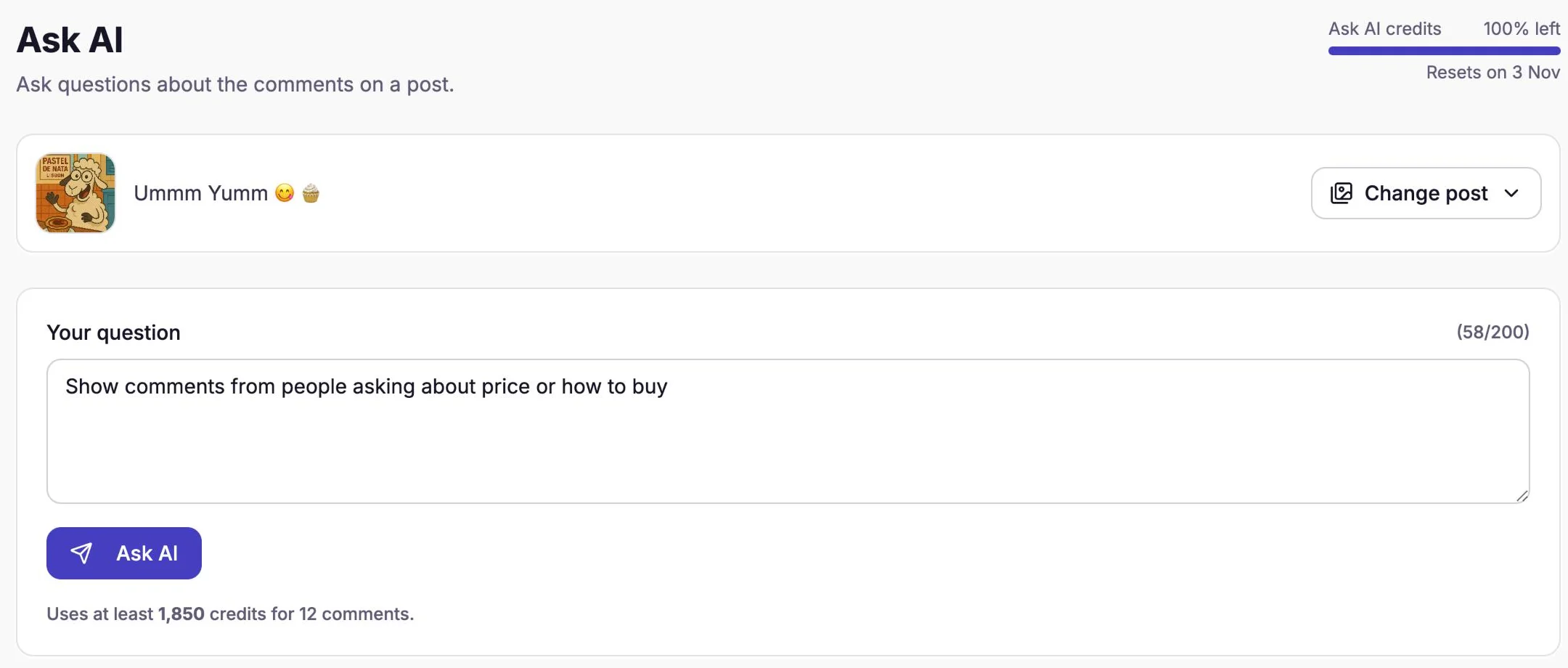
A question ready to ask, with its minimum cost shown underneath. Select Ask AI.
The button says "Reading the comments…" while it works, and "Answer ready" appears when it's done. It usually takes a few seconds; longer on a busy post.
What kind of answer will I get?
It depends on how you ask.
Ask it to show, find or list comments, and you get the matching comments themselves, with a one-line summary above them. They appear in the same list as the Bulk actions tab, with the same buttons, so you can select them and Reply, Hide, Delete, Restrict or Add tags straight away. If nothing matches, it says "No comments match your question."
Ask anything else, such as a summary, a count or a comparison, and you get a written Answer.
| You ask | You get |
|---|---|
| "Show comments from people asking about price" | A list of those comments, ready to reply to |
| "Find complaints about delivery" | A list of those comments |
| "List comments that mention another brand" | A list of those comments |
| "What are customers saying about pricing?" | A written summary |
| "How many people are asking to buy?" | A written answer with the count |
| "What do people ask about most?" | A written summary of the common questions |
What questions work well?
Ask about one thing at a time, in your customers' words:
- Find buyers: "Show comments from people who want to buy or ask how to order."
- Answer questions: "Show the questions people asked about the product." Then reply to them together.
- Catch problems early: "Find complaints about sizing, delivery or quality."
- Understand the mood: "Are people happy with the new flavour? Summarise in three points."
- Check a giveaway: "How many comments tag a friend?"
Ask AI reads each comment's text, who wrote it, when, whether it's hidden, and whether it's a reply to another comment. It judges every comment from its words, so it also works on comments brought in with Sync comments, which the Category and Intent filters can't sort. It doesn't know anything outside the comments, such as your sales or whether someone actually bought.
What are the limits?
- One post at a time. Ask AI reads the post you choose, not your whole account.
- The newest 500 comments. On bigger posts, older comments aren't read.
- AI can be wrong. It may miss a comment or include one that doesn't fit. Glance over a list before you hide or delete from it.
- Credits. A question about a post with around 200 comments uses about 30,000 credits. If you don't have enough for the post you picked, the line under the button says "You don't have enough Ask AI credits left for this month" and the button stays off. Credits reset at the start of each billing period.
Is there a free way to see this?
Partly. Every post's Insights tab has a Comment intelligence card that counts purchase intent, questions and complaints among the comments CommenSense has read. It's on every plan and uses no credits. It gives you the numbers; Ask AI finds the actual comments and explains them. See what the numbers in CommenSense mean.
You can also filter a post's comments by Intent (such as Purchase Intent or Complaint) on the Bulk actions tab, on Basic and higher, without using credits. See how to hide or delete many comments at once.
Related guides
What are comment scans and Ask AI credits?
What uses a comment scan, what happens when they run out, how Ask AI credits are counted, and when both reset or carry over.
Updated
How to hide or delete many Instagram comments at once
Clean up a busy Instagram post in minutes: filter its comments by category, intent or tag in CommenSense, then hide, delete, reply to or tag them together.
Updated
What the numbers in CommenSense mean
Runs, Clicks, Contacts captured, DMs sent, Moderated and the rest: what each number in CommenSense counts, and why two of them can differ.
Updated