
How to hide or delete many Instagram comments at once
Comment moderationUpdated By Team CommenSense
On this page
After a post goes viral, or a spam wave hits, the Instagram app makes you deal with comments one at a time. Bulk actions lists a post's comments with the labels CommenSense's AI gave them, so you can pick out the ones you want and act on all of them at once.
How do I hide or delete many comments?
In the left sidebar, open Posts, select Choose a post and pick the post.
Go to the Bulk actions tab.
You'll see the post's comments, newest first, with their labels, including replies in threads. 50 load at a time; select Load more at the bottom for the rest.
Narrow the list with the search box and filters.
For example, open Category and tick Negativity, or open Intent and tick Spam / Promo. The next section explains every filter.
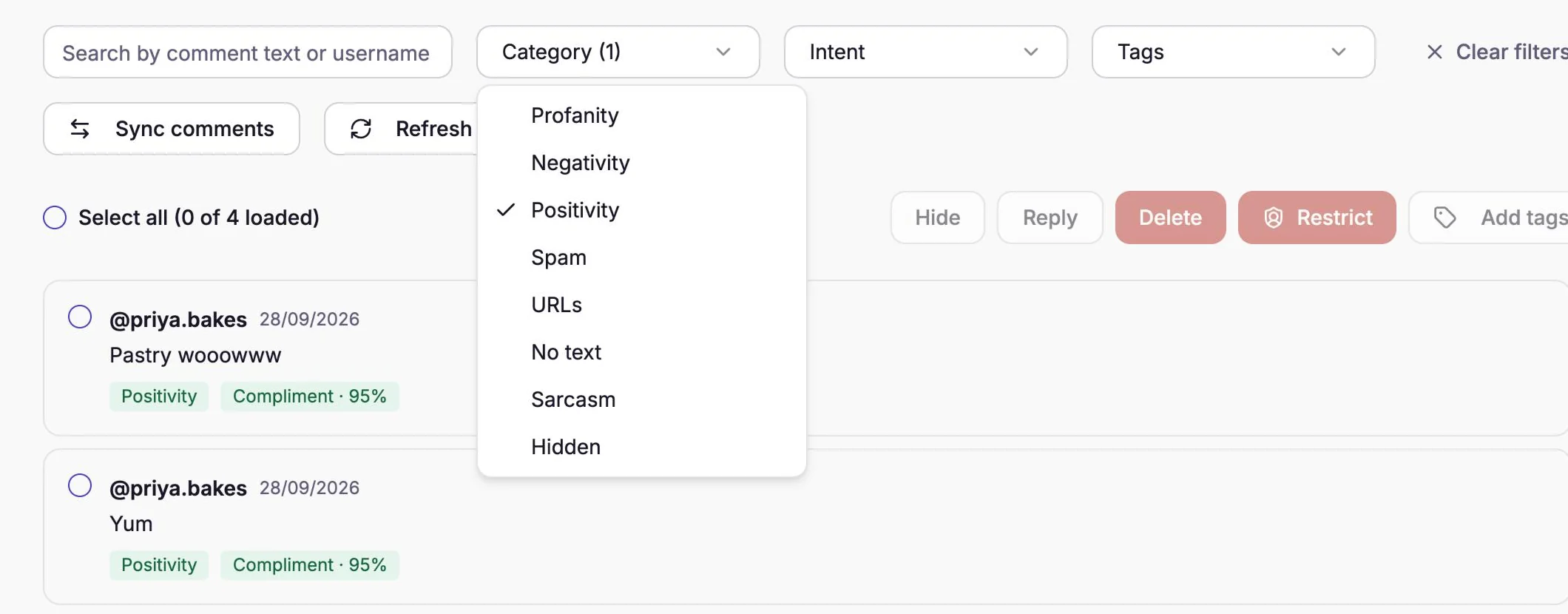
The Category filter, here showing only positive comments. Tick the comments you want, or tick Select all.
Select all selects every comment in the filtered list. The count next to it, such as "4 of 4 loaded", shows how many are selected.
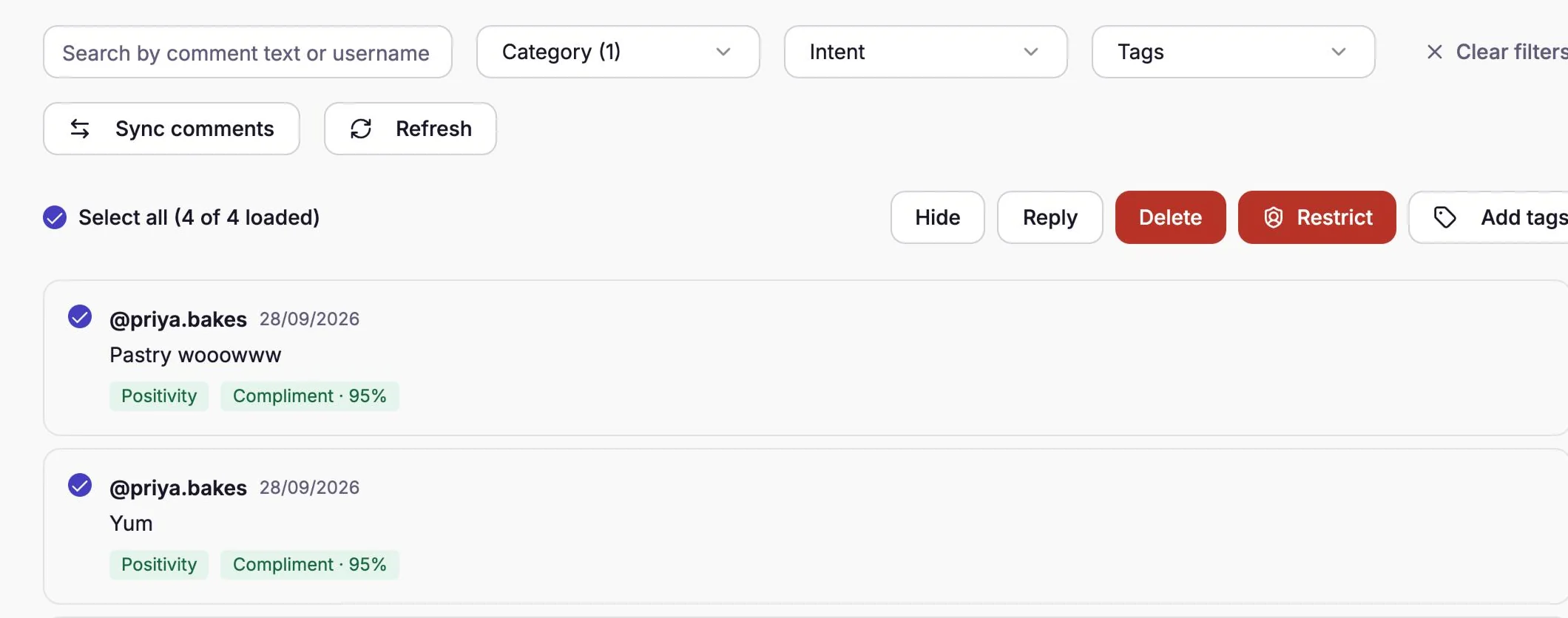
With comments selected, the action buttons switch on. Select Hide or Delete, then Confirm.
The confirmation says how many comments it will act on. Check that number before you confirm.
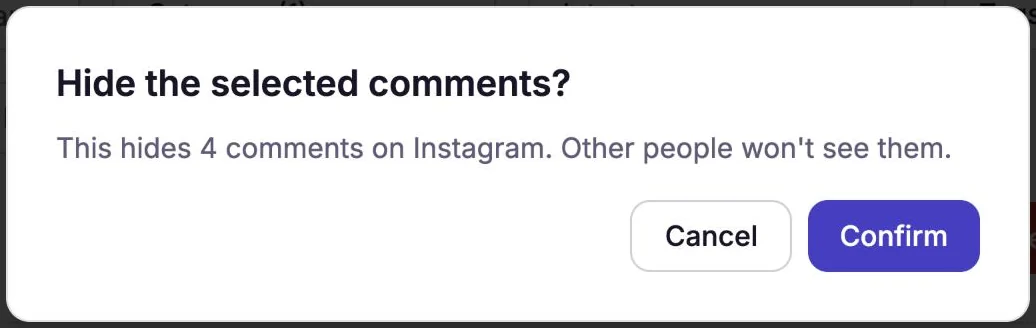
Hiding asks you to confirm first.
CommenSense then works through the comments one by one, so keep the page open until it says it's done: "Comments hidden" or "Comments deleted". If some comments were already removed on Instagram, the message says how many, and they're taken off the list.
Which filters can I use?
| Filter | What it finds |
|---|---|
| Search | Comments containing a word, or written by a username. Works on every comment, labelled or not. |
| Category | Profanity, Negativity, Positivity, Spam, URLs, No text, Sarcasm, and Hidden (comments already hidden on Instagram). |
| Intent | What the commenter wants: Compliment, Complaint, Question, Purchase Intent, Spam / Promo, Hate / Harassment, Competitor, Off Topic. The badge shows how sure the AI is, such as "Compliment · 95%". |
| Tags | Your own labels, added with Add tags (up to 30 per Instagram account). |
Ticking several options in one filter finds comments that match any of them. Using two filters together, such as a Category and an Intent, finds comments that match both. Clear filters resets them.
Some comments carry two intent badges, such as "Purchase Intent · 90%" and "Question · 80%". The Intent filter matches the first one, the comment's main intent.
Filters only search the comments that are loaded on the page. On a post with more than 50 comments, a line above the list says how many were searched, for example "Searched the newest 50 of 207 comments". Select Load more at the bottom until it disappears to search them all, then select.
What else can I do with the selected comments?
| Button | What it does | Plan |
|---|---|---|
| Hide | Hides them on Instagram. The writer still sees their comment; others don't. You can unhide in the Instagram app. | Basic and higher |
| Delete | Deletes them from Instagram permanently. It can't be undone. | Basic and higher |
| Reply | Posts the same public reply (up to 2,200 characters) under each one. If a selected comment is itself a reply, your reply goes to the comment it answered. | Basic and higher |
| Restrict | Restricts the people who wrote them, so their future comments are hidden or deleted automatically. | Pro and Business |
| Add tags | Adds your own labels, for example "follow up" or "giveaway entry", to filter by later. | Every plan with the tab |
Not sure which to choose? See hide, delete or restrict?
Why are some comments missing, or missing labels?
- Comments from before you connected aren't in CommenSense until you sync them. Select Sync comments (Pro and Business). The sync runs in the background and you get a notification when it's finished. It also removes comments that were deleted on Instagram.
- Synced comments have no labels. CommenSense's AI reads comments as they arrive, not ones imported later, so Category and Intent filters skip them. Find them with the search box instead.
- Comments that arrived while your comment scans were used up weren't read either, so they have no labels. See what comment scans are.
- New comments not showing yet? Select Refresh.
Can I find comments by asking a question?
Yes, on Pro and Business. Ask AI answers a question like "show comments asking about price" with a list of matching comments, and that list has the same buttons as Bulk actions. See Ask AI: find buyers, questions and complaints in your comments.
To stop the same kinds of comments from piling up again, switch on the matching rules in Comment moderation, which hide new ones as they arrive.
Related guides
Hide, delete or restrict? What to do with a bad comment on Instagram
When to hide a comment, when to delete it, and when to restrict the person, what each one does on Instagram, and how to do each in CommenSense.
Updated
How to hide Instagram comments automatically
Hide spam, links, swearing and your own banned words on every Instagram post automatically with CommenSense, and know exactly what gets hidden.
Updated
How to stop spam and bot comments on Instagram
Stop spam and bot comments on Instagram: what Instagram itself offers, then how CommenSense hides links, bot-like comments and spam phrases, and cleans up the rest.
Updated
Ask AI: find buyers, questions and complaints in your comments
Ask a plain question about an Instagram post's comments and get an answer or a list of matching comments, such as who wants to buy or what people complain about.
Updated