
How to schedule Instagram posts with CommenSense
Getting startedUpdated By Team CommenSense
On this page
Publish lets you prepare Instagram posts in the same place you manage comments and DMs, and send them out now or at a set time. It posts through Instagram's official publishing API, so a post goes out exactly as if you'd shared it yourself.
How do I create a post?
In the left sidebar, under Create, open Publish and select Create post.
Choose the Post type: Image, Video, Reels, Stories or Carousel.
The type decides which files you can add. See the table below.
Under Photos or videos, add your file.
For an Image or Carousel, the crop button on each picture lets you trim it before posting. For a Carousel, add 2 to 10 files; you can add more after the first ones.
Write your Caption.
Up to 2,200 characters. Switch on Label as AI-generated if the content was made with AI; it adds Instagram's "AI info" label to the post.
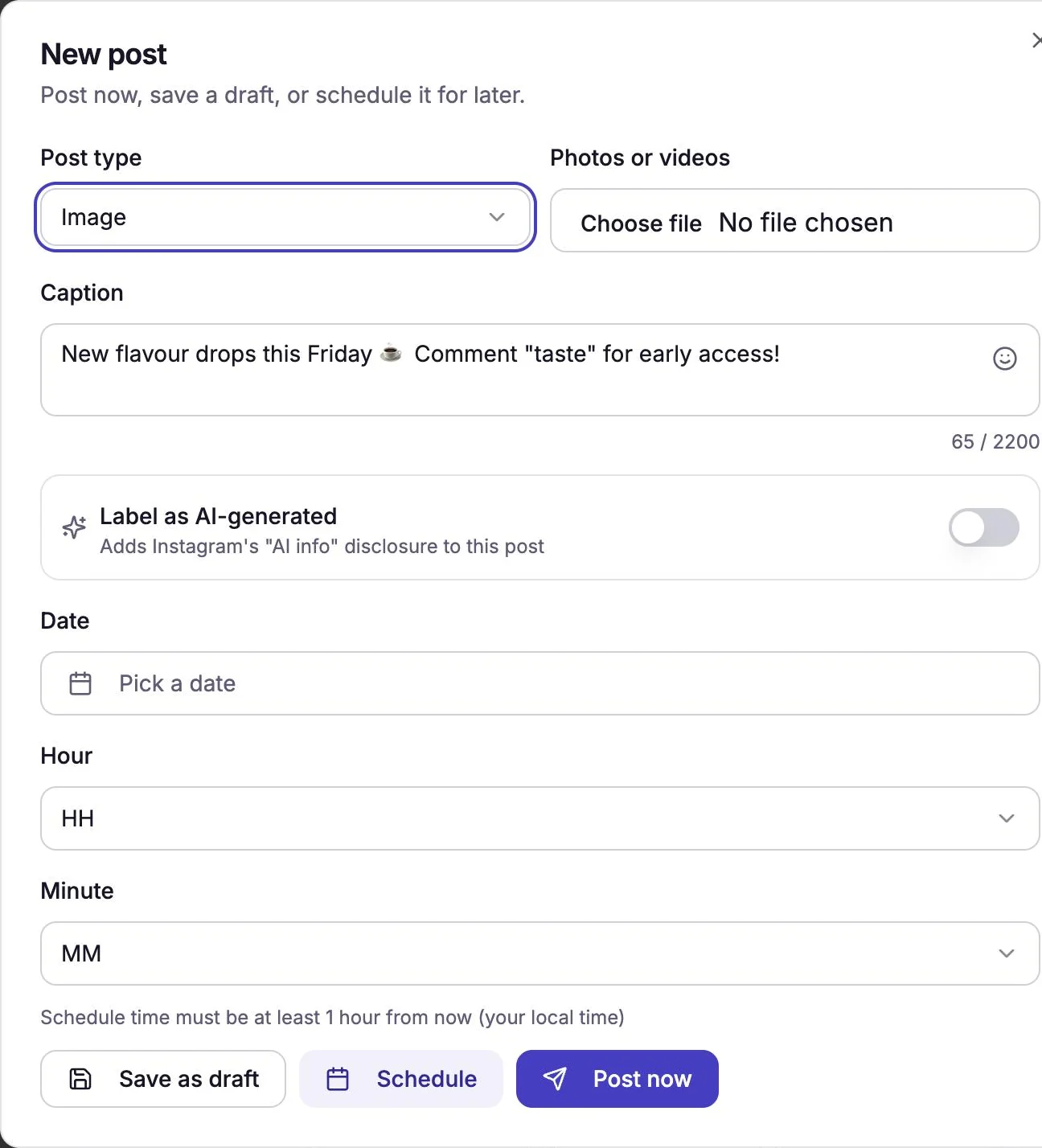
The New post window. Post it now, schedule it, or save it for later.
Post now uploads your file and publishes it straight away. Video can take up to a minute while Instagram processes it, so keep the window open.
Schedule publishes it at the date and time you pick. Fill in Date, Hour and Minute first. The time is in your own time zone and must be at least one hour from now.
- Save as draft keeps it in CommenSense without posting or scheduling it.
Which files can I post?
| Post type | What you can add |
|---|---|
| Image | One JPEG photo. |
| Video | One MP4 or MOV video, 3 to 60 seconds long. |
| Reels | One MP4 or MOV video, 3 to 60 seconds long. |
| Stories | One JPEG photo. Video stories aren't supported. |
| Carousel | 2 to 10 items: JPEG photos, MP4 or MOV videos, or a mix. |
Instagram's publishing API only accepts JPEG photos (Meta: Content publishing). If your photo is a PNG or HEIC, save it as a .jpg first. CommenSense checks a video's length before uploading, so a video outside 3 to 60 seconds is refused straight away with the reason.
How does scheduling work?
Scheduled posts and drafts are listed on the Upcoming tab. CommenSense checks for posts that are due every five minutes, so a scheduled post goes out within about five minutes of the time you chose.
- To change a draft or scheduled post, select the pencil next to it. A scheduled post can't be edited in the last hour before it goes out. Delete it and create a new one instead.
- To cancel one, select the bin next to it.
Once a post has gone out, or failed, it moves to the History tab.
What if a post fails?
A post that couldn't be published is marked Failed on the History tab, with the reason next to it. CommenSense doesn't send a notification for a failed scheduled post, so check History after the time you set.
| Reason shown | What to do |
|---|---|
| Instagram only accepts JPEG images for this post. | Save the photo as a .jpg and create the post again. |
| This image's aspect ratio isn't supported (must be between 4:5 and 1.91:1). | Crop the photo to a shape in that range, for example square, and try again. |
| Your caption is too long, or has too many hashtags/mentions. | Shorten the caption or use fewer hashtags and @mentions. |
| You've reached Instagram's daily posting limit (100/day). | Instagram allows 100 posts published by apps in 24 hours, and a carousel counts as one (Meta). Try again later. |
| Your Instagram connection has expired. | Reconnect the account in Settings. See connection errors. |
| Instagram couldn't process one of your media files. | Try a different file, or export the video again. |
Can I delete a post from CommenSense?
Only from CommenSense's list. Instagram doesn't let apps delete published posts, so deleting a post on the History tab removes it from CommenSense but it stays live on Instagram. To take it down, delete it in the Instagram app. Drafts and scheduled posts that haven't gone out yet are deleted for good.
Does publishing use my allowances?
No. Publishing doesn't use comment scans or Ask AI credits, and there's no CommenSense limit on how many posts you publish. Instagram's own limit of 100 posts a day still applies. For what does use your allowances, see comment scans and Ask AI credits.
Related guides
How to connect Instagram to CommenSense (and which accounts work)
Connect a Business or Creator Instagram account to CommenSense, no Facebook Page needed, and fix the usual connection problems.
Updated
Instagram connection errors in CommenSense, and how to fix them
What each Instagram connection error in CommenSense means, why an account can need reconnecting later, and how to get it working again.
Updated
What are comment scans and Ask AI credits?
What uses a comment scan, what happens when they run out, how Ask AI credits are counted, and when both reset or carry over.
Updated