
How to set up an Instagram auto-DM before you post
Comment replies & DMsUpdated By Team CommenSense
On this page
A "comment GUIDE for the link" post gets most of its comments in the first hour. Setting up the automation for one post means publishing first and building it afterwards, while the first comments go unanswered. A Next post automation is set up beforehand: write it while you prepare the post, publish when you're ready, and it's already running.
How do I set it up?
In the left sidebar, under Engage, open Automations and select New automation.
Choose Comments, then Your next post or reel, and select Continue.
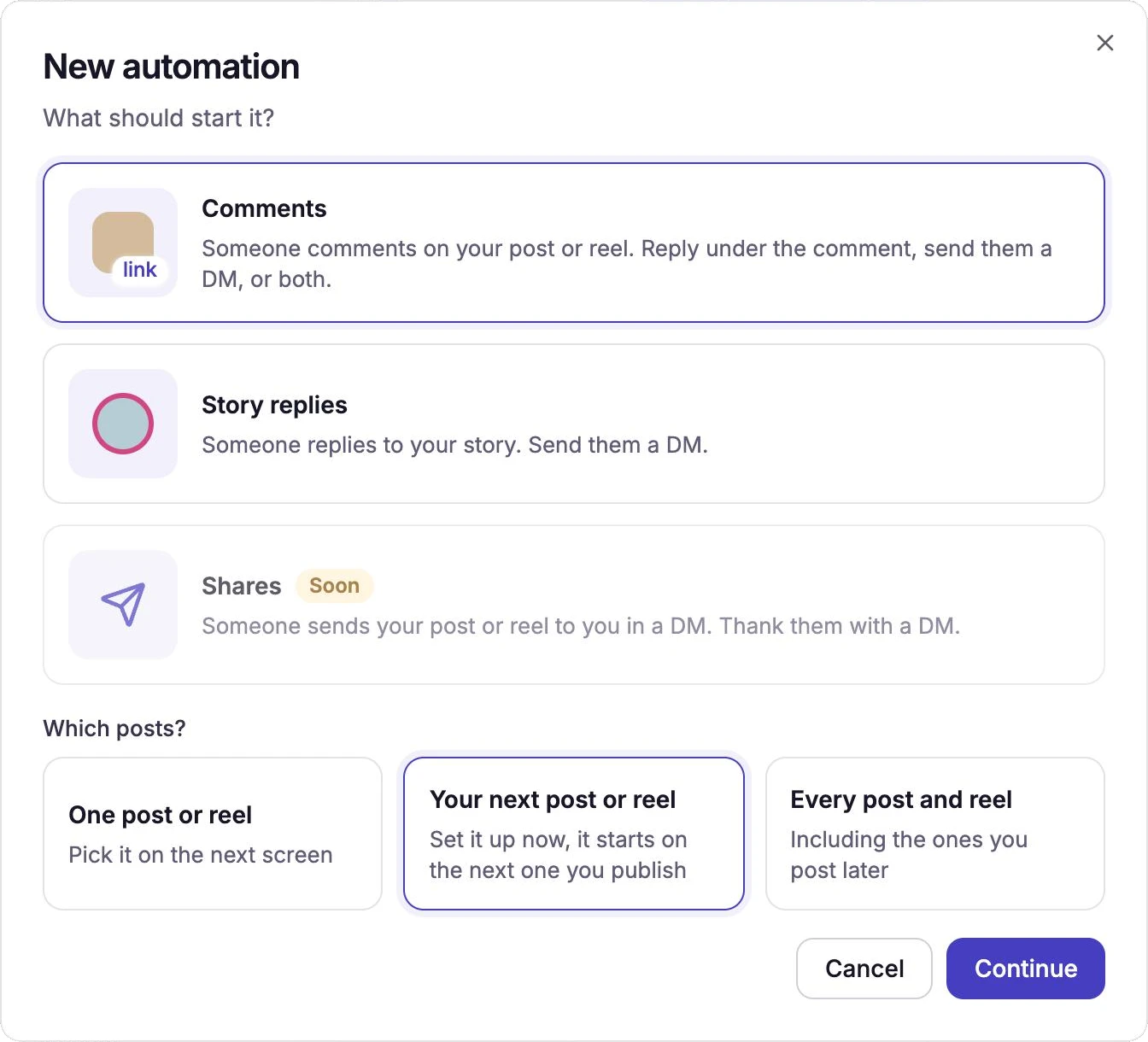
Your next post or reel: set up now, starts on the next one you publish. Add your keywords, the reply under the comment and the DM, as for any comment automation.
Everything works the same as in an automation for one post: keywords or every comment, the public reply, the opening message, the follow check, collecting an email or phone number, and every DM format. See how to set up a comment-to-DM automation for each step. The line under the name reads "Comments on your next post or reel, once you publish it".
Select Create automation, then publish your post or reel.
Until then, the Runs on column of your Automations list shows Next post and Waiting. Once it attaches, the column shows the post's picture, and you get a notification in CommenSense: "Next post automation is live".
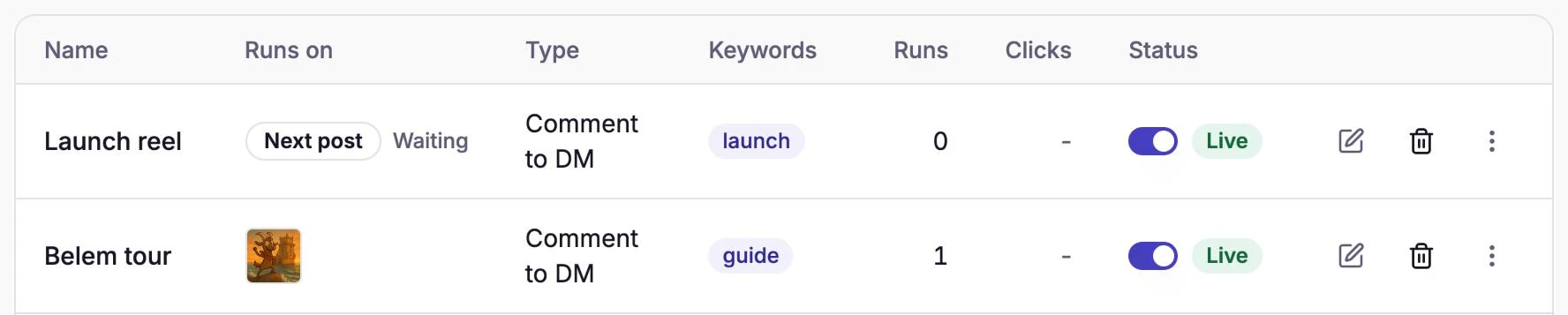
Waiting, and attached to a reel.
Which post does it attach to?
The first post or reel published after you created it, going by the time Instagram gives the post:
- Posts already live never attach, however recent.
- Photos, carousels and reels attach. Stories don't: replies to a story have their own automations (see how to auto-reply to story replies).
- It doesn't matter how you publish: the Instagram app, Meta Business Suite, a scheduling tool or CommenSense's own Publish.
- If two go up close together, the earlier one wins, even if the later one gets the first comment.
When does it start answering?
Instagram doesn't tell apps that you've published something, so CommenSense finds out when someone comments:
- On the first comment from someone else. The automation attaches there and then, and that first commenter gets their reply and DM like everyone after them. Your own comments, replies inside a thread and comments that are only a GIF or sticker don't count.
- Straight away if you publish with CommenSense, because then CommenSense knows the post the moment it's live.
Until somebody comments, the list keeps showing Waiting, even if the post is already up. That's expected.
Can I have more than one?
One can wait at a time on each Instagram account. While one is waiting, Your next post or reel is greyed out in the New automation window and names the one that's waiting. Once it attaches, you can set up the next one.
To send different DMs for different keywords on the same post, wait until the first has attached, then create a second automation for that post (One post or reel). If two match the same comment, the order is the same as for any automations on one post: see what happens when two automations match.
What happens after it attaches?
It becomes an ordinary automation for that post. You can edit it, switch it off or delete it like any other, and on Pro and Business you can re-run it on the post's earlier comments. It won't move to later posts: for your following post, set up a new one.
Common questions
I switched it off while it was waiting. What happens when I switch it back on? It waits again from the moment you switch it on, so a post you published while it was off won't get it.
Can I edit it while it's waiting? Yes, keywords, replies and DM alike. It stays waiting for your next post.
What if I never publish? It keeps waiting. Delete it from the Automations list if you change your plans.
Should I use it instead of an "every post" automation? Use Every post and reel for a keyword you use on all your posts. Use Your next post or reel for a one-off: a launch, a giveaway or a guide with its own link.
Related guides
How to send an automatic DM when someone comments on your Instagram post
Set up a comment-to-DM automation in CommenSense: choose the post, the keywords and the message, and see exactly what the commenter receives.
Updated
How keywords work in CommenSense (and how to choose good ones)
Why a keyword can match the wrong comment, how CommenSense matches keywords in automations and hide rules, and how to pick ones that work.
Updated
How to schedule Instagram posts with CommenSense
Post or schedule Instagram photos, reels, stories and carousels from CommenSense with Publish: which files work, how scheduling works, and what to do if a post fails.
Updated
Why didn't my automation reply or send a DM?
Work out why a CommenSense automation skipped a comment, from keyword matches and status to follow checks, plan limits and Instagram delays.
Updated